Conky на Ubuntu 15.10 показывает оформление окон
После обновления до Ubuntu 15.10 conky показывает границы окон и тени.
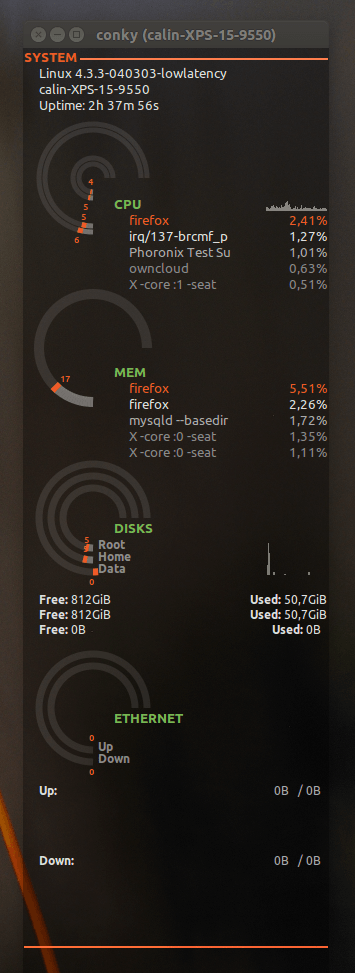
Как я могу обойти это?
Вот тогда содержание темы:
#==============================================================================
#                               conkyrc_seamod
# Date    : 05/02/2012
# Author  : SeaJey
# Version : v0.1
# License : Distributed under the terms of GNU GPL version 2 or later
#
# This version is a modification of conkyrc_lunatico wich is modification of conkyrc_orange
#
# conkyrc_orange:    http://gnome-look.org/content/show.php?content=137503&forumpage=0
# conkyrc_lunatico:  http://gnome-look.org/content/show.php?content=142884
#==============================================================================

background yes
update_interval 1

cpu_avg_samples 1
net_avg_samples 2
temperature_unit celsius

double_buffer yes
no_buffers yes
text_buffer_size 2048

gap_x 40
gap_y 70
minimum_size 300 900
maximum_width 350

own_window yes
own_window_type normal
own_window_class conky
own_window_transparent no
own_window_argb_visual yes
own_window_colour 000000
own_window_argb_value 102
own_window_hints undecorate,sticky,skip_taskbar,skip_pager,below

border_inner_margin 0
border_outer_margin 0
alignment top_right


draw_shades no
draw_outline no
draw_borders no
draw_graph_borders no

override_utf8_locale yes
use_xft yes
xftfont caviar dreams:size=10
xftalpha 0.5
uppercase no

# Defining colors
default_color FFFFFF
# Shades of Gray
color1 DDDDDD
color2 AAAAAA
color3 888888
# Orange
color4 EF5A29
# Green
color5 77B753

# Loading lua script for drawning rings
lua_load ./seamod_rings.lua
lua_draw_hook_post main

## System information using conky capabilities

# Header with base system info
own_window_argb_value 102
own_window_colour 000000
TEXT
${font Ubuntu:size=10,weight:bold}${color4}SYSTEM ${hr 2}
${offset 15}${font Ubuntu:size=10,weight:normal}${color1}$sysname $kernel
${offset 15}${font Ubuntu:size=10,weight:normal}${color1}$nodename
${offset 15}${font Ubuntu:size=10,weight:normal}${color1}Uptime: $uptime

# Showing CPU Graph
${voffset 20}
${offset 120}${cpugraph 40,183 666666 666666}${voffset -25}
${offset 90}${font Ubuntu:size=10,weight:bold}${color5}CPU
# Showing TOP 5 CPU-consumers
${offset 105}${font Ubuntu:size=10,weight:normal}${color4}${top name 1}${alignr}${top cpu 1}%
${offset 105}${font Ubuntu:size=10,weight:normal}${color1}${top name 2}${alignr}${top cpu 2}%
${offset 105}${font Ubuntu:size=10,weight:normal}${color2}${top name 3}${alignr}${top cpu 3}%
${offset 105}${font Ubuntu:size=10,weight:normal}${color3}${top name 4}${alignr}${top cpu 4}%
${offset 105}${font Ubuntu:size=10,weight:normal}${color3}${top name 5}${alignr}${top cpu 5}%

#Showing memory part with TOP 5
${voffset 40}
${offset 90}${font Ubuntu:size=10,weight:bold}${color5}MEM
${offset 105}${font Ubuntu:size=10,weight:normal}${color4}${top_mem name 1}${alignr}${top_mem mem 1}%
${offset 105}${font Ubuntu:size=10,weight:normal}${color1}${top_mem name 2}${alignr}${top_mem mem 2}%
${offset 105}${font Ubuntu:size=10,weight:normal}${color2}${top_mem name 3}${alignr}${top_mem mem 3}%
${offset 105}${font Ubuntu:size=10,weight:normal}${color3}${top_mem name 4}${alignr}${top_mem mem 4}%
${offset 105}${font Ubuntu:size=10,weight:normal}${color3}${top_mem name 4}${alignr}${top_mem mem 5}%

# Showing disk partitions: root, home and Data
${voffset 28}
${offset 90}${font Ubuntu:size=10,weight:bold}${color5}DISKS
${offset 120}${diskiograph 33,183 666666 666666}${voffset -30}
${voffset 20}
${offset 15}${font Ubuntu:size=9,weight:bold}${color1}Free: ${font Ubuntu:size=9,weight:normal}${fs_free /}${alignr}${font Ubuntu:size=9,weight:bold}Used: ${font Ubuntu:size=9,weight:normal}${fs_used /}
${offset 15}${font Ubuntu:size=9,weight:bold}${color1}Free: ${font Ubuntu:size=9,weight:normal}${fs_free /home}${alignr}${font Ubuntu:size=9,weight:bold}Used: ${font Ubuntu:size=9,weight:normal}${fs_used /home}
${offset 15}${font Ubuntu:size=9,weight:bold}${color1}Free: ${font Ubuntu:size=9,weight:normal}${fs_free /media/Data}${alignr}${font Ubuntu:size=9,weight:bold}Used: ${font Ubuntu:size=9,weight:normal}${fs_used /media/Data}

# Network data (my desktop have only LAN). ETHERNET ring is mostly useless but looks pretty, main info is in the graphs
${voffset 43}
${offset 90}${font Ubuntu:size=10,weight:bold}${color5}ETHERNET
${voffset 40}
${offset 15}${color1}${font Ubuntu:size=9,weight:bold}Up: ${alignr}${font Ubuntu:size=9,weight:normal}$color2${upspeed eth0} / ${totalup}
${offset 15}${upspeedgraph eth0 40,285 4B1B0C FF5C2B 100 -l}
${offset 15}${color1}${font Ubuntu:size=9,weight:bold}Down: ${alignr}${font Ubuntu:size=9,weight:normal}$color2${downspeed eth0} / ${totaldown}
${offset 15}${downspeedgraph eth0 40,285 324D23 77B753 100 -l}

${color4}${hr 2}
Вот содержание seamod_rings.lua:
--==============================================================================
--                            seamod_rings.lua
--
--  Date    : 05/02/2012
--  Author  : SeaJey
--  Version : v0.1
--  License : Distributed under the terms of GNU GPL version 2 or later
--
--  This version is a modification of lunatico_rings.lua wich is modification of conky_orange.lua
--
--  conky_orange.lua:    http://gnome-look.org/content/show.php?content=137503&forumpage=0
--  lunatico_rings.lua:  http://gnome-look.org/content/show.php?content=142884
--==============================================================================

require 'cairo'


--------------------------------------------------------------------------------
--                                                                    gauge DATA
gauge = {
{
    name='cpu',                    arg='cpu0',                  max_value=100,
    x=70,                          y=130,
    graph_radius=54,
    graph_thickness=5,
    graph_start_angle=180,
    graph_unit_angle=2.7,          graph_unit_thickness=2.7,
    graph_bg_colour=0xffffff,      graph_bg_alpha=0.1,
    graph_fg_colour=0xFFFFFF,      graph_fg_alpha=0.3,
    hand_fg_colour=0xEF5A29,       hand_fg_alpha=1.0,
    txt_radius=64,
    txt_weight=0,                  txt_size=9.0,
    txt_fg_colour=0xEF5A29,        txt_fg_alpha=1.0,
    graduation_radius=28,
    graduation_thickness=0,        graduation_mark_thickness=1,
    graduation_unit_angle=27,
    graduation_fg_colour=0xFFFFFF, graduation_fg_alpha=0.3,
    caption='',
    caption_weight=1,              caption_size=9.0,
    caption_fg_colour=0xFFFFFF,    caption_fg_alpha=0.3,
},
{
    name='cpu',                    arg='cpu1',                  max_value=100,
    x=70,                          y=130,
    graph_radius=48,
    graph_thickness=5,
    graph_start_angle=180,
    graph_unit_angle=2.7,          graph_unit_thickness=2.7,
    graph_bg_colour=0xffffff,      graph_bg_alpha=0.1,
    graph_fg_colour=0xFFFFFF,      graph_fg_alpha=0.3,
    hand_fg_colour=0xEF5A29,       hand_fg_alpha=1.0,
    txt_radius=40,
    txt_weight=0,                  txt_size=9.0,
    txt_fg_colour=0xEF5A29,        txt_fg_alpha=1.0,
    graduation_radius=28,
    graduation_thickness=0,        graduation_mark_thickness=1,
    graduation_unit_angle=27,
    graduation_fg_colour=0xFFFFFF, graduation_fg_alpha=0.3,
    caption='',
    caption_weight=1,              caption_size=9.0,
    caption_fg_colour=0xFFFFFF,    caption_fg_alpha=0.3,
},
{
    name='cpu',                    arg='cpu2',                  max_value=100,
    x=70,                          y=130,
    graph_radius=20,
    graph_thickness=5,
    graph_start_angle=180,
    graph_unit_angle=2.7,          graph_unit_thickness=2.7,
    graph_bg_colour=0xffffff,      graph_bg_alpha=0.1,
    graph_fg_colour=0xFFFFFF,      graph_fg_alpha=0.3,
    hand_fg_colour=0xEF5A29,       hand_fg_alpha=1.0,
    txt_radius=30,
    txt_weight=0,                  txt_size=9.0,
    txt_fg_colour=0xEF5A29,        txt_fg_alpha=1.0,
    graduation_radius=28,
    graduation_thickness=0,        graduation_mark_thickness=1,
    graduation_unit_angle=27,
    graduation_fg_colour=0xFFFFFF, graduation_fg_alpha=0.3,
    caption='',
    caption_weight=1,              caption_size=9.0,
    caption_fg_colour=0xFFFFFF,    caption_fg_alpha=0.3,
},
{
    name='cpu',                    arg='cpu3',                  max_value=100,
    x=70,                          y=130,
    graph_radius=14,
    graph_thickness=5,
    graph_start_angle=180,
    graph_unit_angle=2.7,          graph_unit_thickness=2.7,
    graph_bg_colour=0xffffff,      graph_bg_alpha=0.1,
    graph_fg_colour=0xFFFFFF,      graph_fg_alpha=0.3,
    hand_fg_colour=0xEF5A29,       hand_fg_alpha=1.0,
    txt_radius=4,
    txt_weight=0,                  txt_size=9.0,
    txt_fg_colour=0xEF5A29,        txt_fg_alpha=1.0,
    graduation_radius=28,
    graduation_thickness=0,        graduation_mark_thickness=1,
    graduation_unit_angle=27,
    graduation_fg_colour=0xFFFFFF, graduation_fg_alpha=0.3,
    caption='',
    caption_weight=1,              caption_size=9.0,
    caption_fg_colour=0xFFFFFF,    caption_fg_alpha=0.3,
},
{
    name='memperc',                arg='',                      max_value=100,
    x=70,                          y=300,
    graph_radius=54,
    graph_thickness=10,
    graph_start_angle=180,
    graph_unit_angle=2.7,          graph_unit_thickness=2.7,
    graph_bg_colour=0xffffff,      graph_bg_alpha=0.1,
    graph_fg_colour=0xFFFFFF,      graph_fg_alpha=0.3,
    hand_fg_colour=0xEF5A29,       hand_fg_alpha=1.0,
    txt_radius=42,
    txt_weight=0,                  txt_size=9.0,
    txt_fg_colour=0xEF5A29,        txt_fg_alpha=1.0,
    graduation_radius=23,
    graduation_thickness=0,        graduation_mark_thickness=2,
    graduation_unit_angle=27,
    graduation_fg_colour=0xFFFFFF, graduation_fg_alpha=0.5,
    caption='',
    caption_weight=1,              caption_size=10.0,
    caption_fg_colour=0xFFFFFF,    caption_fg_alpha=0.3,
},
{
    name='fs_used_perc',           arg='/media/Data',                     max_value=100,
    x=70,                          y=470,
    graph_radius=54,
    graph_thickness=7,
    graph_start_angle=180,
    graph_unit_angle=2.7,          graph_unit_thickness=2.7,
    graph_bg_colour=0xffffff,      graph_bg_alpha=0.1,
    graph_fg_colour=0xFFFFFF,      graph_fg_alpha=0.3,
    hand_fg_colour=0xEF5A29,       hand_fg_alpha=1.0,
    txt_radius=64,
    txt_weight=0,                  txt_size=9.0,
    txt_fg_colour=0xEF5A29,        txt_fg_alpha=1.0,
    graduation_radius=23,
    graduation_thickness=0,        graduation_mark_thickness=2,
    graduation_unit_angle=27,
    graduation_fg_colour=0xFFFFFF, graduation_fg_alpha=0.3,
    caption='Data',
    caption_weight=1,              caption_size=12.0,
    caption_fg_colour=0xFFFFFF,    caption_fg_alpha=0.5,
},
{
    name='fs_used_perc',           arg='/home/',                     max_value=100,
    x=70,                          y=470,
    graph_radius=42,
    graph_thickness=7,
    graph_start_angle=180,
    graph_unit_angle=2.7,          graph_unit_thickness=2.7,
    graph_bg_colour=0xffffff,      graph_bg_alpha=0.1,
    graph_fg_colour=0xFFFFFF,      graph_fg_alpha=0.3,
    hand_fg_colour=0xEF5A29,       hand_fg_alpha=1.0,
    txt_radius=32,
    txt_weight=0,                  txt_size=9.0,
    txt_fg_colour=0xEF5A29,        txt_fg_alpha=1.0,
    graduation_radius=23,
    graduation_thickness=0,        graduation_mark_thickness=2,
    graduation_unit_angle=27,
    graduation_fg_colour=0xFFFFFF, graduation_fg_alpha=0.3,
    caption='Home',
    caption_weight=1,              caption_size=12.0,
    caption_fg_colour=0xFFFFFF,    caption_fg_alpha=0.5,
},
{
    name='fs_used_perc',           arg='/',                     max_value=100,
    x=70,                          y=470,
    graph_radius=30,
    graph_thickness=7,
    graph_start_angle=180,
    graph_unit_angle=2.7,          graph_unit_thickness=2.7,
    graph_bg_colour=0xffffff,      graph_bg_alpha=0.1,
    graph_fg_colour=0xFFFFFF,      graph_fg_alpha=0.3,
    hand_fg_colour=0xEF5A29,       hand_fg_alpha=1.0,
    txt_radius=22,
    txt_weight=0,                  txt_size=9.0,
    txt_fg_colour=0xEF5A29,        txt_fg_alpha=1.0,
    graduation_radius=23,
    graduation_thickness=0,        graduation_mark_thickness=2,
    graduation_unit_angle=27,
    graduation_fg_colour=0xFFFFFF, graduation_fg_alpha=0.3,
    caption='Root',
    caption_weight=1,              caption_size=12.0,
    caption_fg_colour=0xFFFFFF,    caption_fg_alpha=0.5,
},
{
    name='downspeedf',           arg='eth0',                     max_value=100,
    x=70,                          y=660,
    graph_radius=54,
    graph_thickness=7,
    graph_start_angle=180,
    graph_unit_angle=2.7,          graph_unit_thickness=2.7,
    graph_bg_colour=0xffffff,      graph_bg_alpha=0.1,
    graph_fg_colour=0xFFFFFF,      graph_fg_alpha=0.3,
    hand_fg_colour=0xEF5A29,       hand_fg_alpha=0,
    txt_radius=64,
    txt_weight=0,                  txt_size=9.0,
    txt_fg_colour=0xEF5A29,        txt_fg_alpha=1.0,
    graduation_radius=28,
    graduation_thickness=0,        graduation_mark_thickness=1,
    graduation_unit_angle=27,
    graduation_fg_colour=0xFFFFFF, graduation_fg_alpha=0.3,
    caption='Down',
    caption_weight=1,              caption_size=12.0,
    caption_fg_colour=0xFFFFFF,    caption_fg_alpha=0.5,
},
{
    name='upspeedf',           arg='eth0',                     max_value=100,
    x=70,                          y=660,
    graph_radius=42,
    graph_thickness=7,
    graph_start_angle=180,
    graph_unit_angle=2.7,          graph_unit_thickness=2.7,
    graph_bg_colour=0xffffff,      graph_bg_alpha=0.1,
    graph_fg_colour=0xFFFFFF,      graph_fg_alpha=0.3,
    hand_fg_colour=0xEF5A29,       hand_fg_alpha=0,
    txt_radius=30,
    txt_weight=0,                  txt_size=9.0,
    txt_fg_colour=0xEF5A29,        txt_fg_alpha=1.0,
    graduation_radius=28,
    graduation_thickness=0,        graduation_mark_thickness=1,
    graduation_unit_angle=27,
    graduation_fg_colour=0xFFFFFF, graduation_fg_alpha=0.3,
    caption='Up',
    caption_weight=1,              caption_size=12.0,
    caption_fg_colour=0xFFFFFF,    caption_fg_alpha=0.5,
},
}

-------------------------------------------------------------------------------
--                                                                 rgb_to_r_g_b
-- converts color in hexa to decimal
--
function rgb_to_r_g_b(colour, alpha)
    return ((colour / 0x10000) % 0x100) / 255., ((colour / 0x100) % 0x100) / 255., (colour % 0x100) / 255., alpha
end

-------------------------------------------------------------------------------
--                                                            angle_to_position
-- convert degree to rad and rotate (0 degree is top/north)
--
function angle_to_position(start_angle, current_angle)
    local pos = current_angle + start_angle
    return ( ( pos * (2 * math.pi / 360) ) - (math.pi / 2) )
end


-------------------------------------------------------------------------------
--                                                              draw_gauge_ring
-- displays gauges
--
function draw_gauge_ring(display, data, value)
    local max_value = data['max_value']
    local x, y = data['x'], data['y']
    local graph_radius = data['graph_radius']
    local graph_thickness, graph_unit_thickness = data['graph_thickness'], data['graph_unit_thickness']
    local graph_start_angle = data['graph_start_angle']
    local graph_unit_angle = data['graph_unit_angle']
    local graph_bg_colour, graph_bg_alpha = data['graph_bg_colour'], data['graph_bg_alpha']
    local graph_fg_colour, graph_fg_alpha = data['graph_fg_colour'], data['graph_fg_alpha']
    local hand_fg_colour, hand_fg_alpha = data['hand_fg_colour'], data['hand_fg_alpha']
    local graph_end_angle = (max_value * graph_unit_angle) % 360

    -- background ring
    cairo_arc(display, x, y, graph_radius, angle_to_position(graph_start_angle, 0), angle_to_position(graph_start_angle, graph_end_angle))
    cairo_set_source_rgba(display, rgb_to_r_g_b(graph_bg_colour, graph_bg_alpha))
    cairo_set_line_width(display, graph_thickness)
    cairo_stroke(display)

    -- arc of value
    local val = value % (max_value + 1)
    local start_arc = 0
    local stop_arc = 0
    local i = 1
    while i <= val do
        start_arc = (graph_unit_angle * i) - graph_unit_thickness
        stop_arc = (graph_unit_angle * i)
        cairo_arc(display, x, y, graph_radius, angle_to_position(graph_start_angle, start_arc), angle_to_position(graph_start_angle, stop_arc))
        cairo_set_source_rgba(display, rgb_to_r_g_b(graph_fg_colour, graph_fg_alpha))
        cairo_stroke(display)
        i = i + 1
    end
    local angle = start_arc

    -- hand
    start_arc = (graph_unit_angle * val) - (graph_unit_thickness * 2)
    stop_arc = (graph_unit_angle * val)
    cairo_arc(display, x, y, graph_radius, angle_to_position(graph_start_angle, start_arc), angle_to_position(graph_start_angle, stop_arc))
    cairo_set_source_rgba(display, rgb_to_r_g_b(hand_fg_colour, hand_fg_alpha))
    cairo_stroke(display)

    -- graduations marks
    local graduation_radius = data['graduation_radius']
    local graduation_thickness, graduation_mark_thickness = data['graduation_thickness'], data['graduation_mark_thickness']
    local graduation_unit_angle = data['graduation_unit_angle']
    local graduation_fg_colour, graduation_fg_alpha = data['graduation_fg_colour'], data['graduation_fg_alpha']
    if graduation_radius > 0 and graduation_thickness > 0 and graduation_unit_angle > 0 then
        local nb_graduation = graph_end_angle / graduation_unit_angle
        local i = 0
        while i < nb_graduation do
            cairo_set_line_width(display, graduation_thickness)
            start_arc = (graduation_unit_angle * i) - (graduation_mark_thickness / 2)
            stop_arc = (graduation_unit_angle * i) + (graduation_mark_thickness / 2)
            cairo_arc(display, x, y, graduation_radius, angle_to_position(graph_start_angle, start_arc), angle_to_position(graph_start_angle, stop_arc))
            cairo_set_source_rgba(display,rgb_to_r_g_b(graduation_fg_colour,graduation_fg_alpha))
            cairo_stroke(display)
            cairo_set_line_width(display, graph_thickness)
            i = i + 1
        end
    end

    -- text
    local txt_radius = data['txt_radius']
    local txt_weight, txt_size = data['txt_weight'], data['txt_size']
    local txt_fg_colour, txt_fg_alpha = data['txt_fg_colour'], data['txt_fg_alpha']
    local movex = txt_radius * math.cos(angle_to_position(graph_start_angle, angle))
    local movey = txt_radius * math.sin(angle_to_position(graph_start_angle, angle))
    cairo_select_font_face (display, "ubuntu", CAIRO_FONT_SLANT_NORMAL, txt_weight)
    cairo_set_font_size (display, txt_size)
    cairo_set_source_rgba (display, rgb_to_r_g_b(txt_fg_colour, txt_fg_alpha))
    cairo_move_to (display, x + movex - (txt_size / 2), y + movey + 3)
    cairo_show_text (display, value)
    cairo_stroke (display)

    -- caption
    local caption = data['caption']
    local caption_weight, caption_size = data['caption_weight'], data['caption_size']
    local caption_fg_colour, caption_fg_alpha = data['caption_fg_colour'], data['caption_fg_alpha']
    local tox = graph_radius * (math.cos((graph_start_angle * 2 * math.pi / 360)-(math.pi/2)))
    local toy = graph_radius * (math.sin((graph_start_angle * 2 * math.pi / 360)-(math.pi/2)))
    cairo_select_font_face (display, "ubuntu", CAIRO_FONT_SLANT_NORMAL, caption_weight);
    cairo_set_font_size (display, caption_size)
    cairo_set_source_rgba (display, rgb_to_r_g_b(caption_fg_colour, caption_fg_alpha))
    cairo_move_to (display, x + tox + 5, y + toy + 1)
    -- bad hack but not enough time !
    if graph_start_angle < 105 then
        cairo_move_to (display, x + tox - 30, y + toy + 1)
    end
    cairo_show_text (display, caption)
    cairo_stroke (display)
end


-------------------------------------------------------------------------------
--                                                               go_gauge_rings
-- loads data and displays gauges
--
function go_gauge_rings(display)
    local function load_gauge_rings(display, data)
        local str, value = '', 0
        str = string.format('${%s %s}',data['name'], data['arg'])
        str = conky_parse(str)
        value = tonumber(str)
        draw_gauge_ring(display, data, value)
    end

    for i in pairs(gauge) do
        load_gauge_rings(display, gauge[i])
    end
end

-------------------------------------------------------------------------------
--                                                                         MAIN
function conky_main()
    if conky_window == nil then
        return
    end

    local cs = cairo_xlib_surface_create(conky_window.display, conky_window.drawable, conky_window.visual, conky_window.width, conky_window.height)
    local display = cairo_create(cs)

    local updates = conky_parse('${updates}')
    update_num = tonumber(updates)

    if update_num > 5 then
        go_gauge_rings(display)
    end

    cairo_surface_destroy(cs)
    cairo_destroy(display)

end
Две другие проблемы с ним, это то, что он отображается в докере в виде значка, и он также остается только на одном экране.
3 ответа
У меня была похожая проблема после обновления до Ubuntu 15.10. Вы можете настроить строку:
own_window_hints undecorated,sticky,skip_taskbar,skip_pager,below
в ~/.conky/Conky Seamod/conky_seamod файл. После этого conky работал по умолчанию.
Если это решит проблему, вы можете принять ответ, чтобы другие могли извлечь из него урок.
На основании этого решения, предложенного VRR
Вы можете заменить все "неукрашенные", найденные в вашей папке conky, на "неукрашенные".
перейдите в папку conky ~/.conky
затем выполнить
find ./ -type f -exec sed -i "s/undecorate/undecorated/g" {} \;
find ./ -type f -exec sed -i "s/undecoratedd/undecorated/g" {} \;
Просто установите conky-manager . В терминале:
sudo add-apt-repository ppa:teejee2008/ppa

sudo apt-get update

sudo apt-get install conky-manager
Откройте conky-manager, выберите тему, перейдите к редактированию виджета> прозрачность, хотя он установлен прозрачным, немного поиграйте с настройкой непрозрачности, а затем вернитесь к прозрачности.